Ok, so far I’ve got a Deck Definition record, and I’ve got a Deck Card record to contain the children of that Deck Definition, but I don’t have a way to create the deck contents from my Deck Building interface. I have an event queue record for whenever someone clicks the card to be added, but it doesn’t yet ADD the card….
I’m going to start by setting up placeholder Player deck card records for each deck – I ALWAYS need 12 slots, so I’ll just create them whenever I create a Deck…. as a wise person once said “Let’s Workflow It!”.
This is a simple flow – when Deck is created, automatically create 12 empty Player Deck Card records – As always I think I’ll make my placeholder creator a Subflow just in case I need to call it in multiple ways.
I need the Deck reference obviously so I can add the card to the deck, so lets make that an input, and let’s put a choice output so we can track success and failure just in case:

Next I want to ensure I only loop for 12 iterations, so let’s create one of my favourite things, a Flow Variable called “iterator”:

Before we try to do anything else to this iterator, we need to set the initial value to zero (so we can do maths to it). If we don’t do this, then the loop won’t have anything to tell it to stop and it might create exactly 1000 records (guess how I know this…):

Next we’ll create the “do until” iterator hits 12 and we’ll make a Create Player Deck Card Record action:

Here all I’m going to add to the record is the Deck reference, and I’m also going to use the Math “add” function to add 1 to the current iterator value so we set the right card position number successfully:

Finally I want to set my iterator using the math function too so that I can ensure that the next loop considers whether I’ve hit my ceiling of 12 iterations:

This gives me my placeholders:

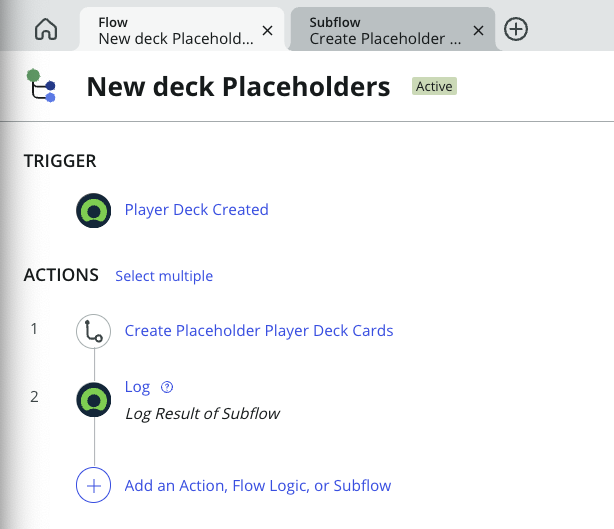
Finally I can wrap my Subflow in a Flow trigger on the Player Deck table for when a new Deck is created:

Leave a Reply